

Jayarajsinh Raol, Technical Application Engineer, BEACON INDIA | November 2026
Which file is the latest? Has this design been approved? Can I edit it right now? If your team asks these questions every week, the Collaborative Lifecycle app was made to answer them.
What Is the Collaborative Lifecycle App?
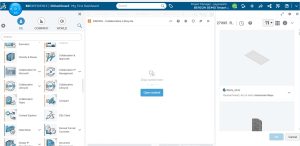
Collaborative Lifecycle is an app on the 3DEXPERIENCE platform that manages the life of your engineering data. The journey starts when a part, assembly or drawing is first saved. From there the app follows it through review, release, revision and, finally, retirement. You can open it in a browser from the compass, or use the same commands from inside SOLIDWORKS, so everyone looks at the same status.
› Create new revisions and keep a clear history of every change
› Lock and unlock files so two people never edit the same file
› Branch a design and see how versions refer to each other
› Move data to another collaborative space or assign a new owner
› View properties, change history and relations from one panel
Every object in the app carries a maturity state. Think of it as a traffic light for your data. It tells everyone
whether a design is still being worked on, is under review, or is ready for production. Each state has a
clear meaning, so nobody has to guess.
| Maturity state | What it means |
|---|---|
| Private | Only the owner can see it. Good for early work. |
| In Work | The default after the first save. Others can open it, and users with permission can lock it. |
| Frozen | Changes are blocked, usually during design review. If the review rejects the design, it goes back to In Work. |
| Released | Approved for production. Any further change needs a new revision. |
| Obsolete | No longer used, but kept for reference. |
Who can move an object from one state to another depends on the user’s role in the collaborative space.
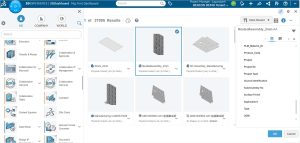
A normal working cycle with the app looks like this.
Lock before you edit. Select the file and lock it. Nobody else can change it while you work. Unlock it
when you are done.
Check the Information panel. Right-click an item and open Information to see its properties, history,
change history and relations.
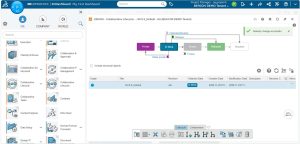
Freeze it for review. Move the design from In Work to Frozen. The reviewer now looks at data that cannot change underneath them.
Release it. Once the design is approved, move it to Released so production knows it is safe to use.
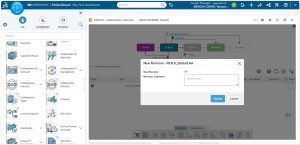
Revise, do not overwrite. When a released design needs a change, create a new revision. The earlier revision stays Released, and the new one starts in work.
Where the App Delivers Practical Impact
The app becomes most valuable when many people touch the same product data: designers, reviewers,
manufacturing and quality. A clear state and revision on every file removes the daily guesswork and keeps
the team moving.
› Everyone sees the same status and revision on every part
› Production works only from Released data
› Fewer errors caused by old or overwritten files
› Faster design reviews, because Frozen data cannot change
› A clear history of what changed and when
› Less time spent searching for, or asking about, the right file
Conclusion
A good design is not only about the model. It is also about knowing where that model stands. The
Collaborative Lifecycle app puts that status in front of every team member, from the first save to the final
release. Teams that use it spend less time chasing files and more time improving the product.
To know more about Collaborative Lifecycle and the 3DEXPERIENCE platform, contact BEACON
INDIA at Call Us:
Karnataka & Goa
Contact Name: Mr. Girish Kumar
Email: techsupport@beacon-india.com
Chennai
Contact Name: Mr. Jayakumar B
Email: jayakumar.b@beacon-india.com
Mumbai
Contact Name : Mr. Anirudh Ayachit
Email: support.mumbai@beacon-india.com
Pune
Contact Name : Mr. Vishal Surwade
Email: support@beacon-india.com
Ahmedabad
Contact Name : Vivek Panicker
Email: vivekp@beacon-india.com
Hyderabad
Contact Name : Mr. Agastiya Venkata Ranuva
Email: agastiya.rv@beacon-india.com
Nashik
Contact Name : Mr. Anirudh Ayachit
Email: anirudh@beacon-india.com
Nagpur
Contact Name : Mr. Dhanush KS
Email: Dhanush.ks@beacon-india.com
For SOLIDWORKS Product Enquiry Contact:
Email : info@beacon-india.com
We Urge You To Call Us For Any Doubts & Clarifications That You May Have. We Are Eager to Talk To You
Call Us: +91 7406663589
Brigade Deccan Heights, 42, 14th Floor, 5th Mile, Tumkur Rd, Yeshwanthpur Industrial Area, Phase 1, Yeswanthpur, Bengaluru, Karnataka 560022
Rated 4.7/5 with a total of 62 reviews
#1120, 11th Floor, Solitaire business Hub - Baner, Balewadi High Street, Baner, Pune-411045
Rated 4.7/5 with a total of 17 reviews
801, 8th Floor, LODHA Supremus, I-Think Techno Campus,Kanjurmarg EAST - MUMBAI, MH, India – 400042.
Rated 5/5 with a total of 51 reviews
501, 5th Floor, Connekt Coworking Space, Gala Argos, Netaji Rd, Ellisbridge, Ahmedabad, Gujarat 380006
Rated 4.1/5 with a total of 7 reviews
Best Engineering Aids & Consultancies Ltd. No 306, Karunaa Conclave, 3rd Floor, AD Block, Shanthi Colony, Anna Nagar, Chennai - 600040
Rated 4.6/5 with a total of 16 reviews
A-101, 1st Floor, The Hub Complex, opp. Shete Hospital, Mahatma Nagar, Parijat Nagar, Nashik, Maharashtra 422005.
Best Engineering Aids & Consultancies Ltd (BEACON) Wellwork Workspaces, L1 - 1017A,B, Lower Ground Floor,Vasavi MPM Grand, Ameerpet, Hyderabad, Telangana 500073
2nd floor, Mokha Tower, Plot No.169, Mankapur Ring Rd, Trimurti Nagar, Nagpur, Maharashtra 440022


 Location